Media Access Control Address (MAC)
-
The MAC address is the physical address of a network interface card (NIC) and is unique.
-
Consists of six bytes (48 bits).
-
The first three bytes (24 bits) are assigned by IEEE to the manufacturer, allowing identification of the manufacturer from the MAC address.
-
Example of a MAC address: 00:21:70:6f:06
or 00-21-70-6F-06-F2
-
The address FF:FF:FF:FF:FF
is used for broadcasting to all devices.
Internet Protocol (IP)
- An IP address is a logical address used to uniquely identify a device on a network.
- Two versions exist: IPv4 (Internet Protocol version 4) and IPv6 (Internet Protocol version 6).
IPv4
| Representation | 1st Octet (8 Bits) | 2nd Octet (8 Bits) | 3rd Octet (8 Bits) | 4th Octet (8 Bits) |
|---|---|---|---|---|
| Decimal | 192. | 168. | 1. | 10 |
| Binary | 11000000 | 10101000 | 00000001 | 00001010 |
- Consists of 32 binary bits, divided into four octets.
- Each octet is converted to a decimal number and separated by a dot. Example: 192.168.1.10
- Each component represents a bit, with each octet consisting of 8 bits.
- Each bit is positioned from right to left, increasing in powers of 2.
To convert an octet of 192 to binary, start from the left and add the necessary number of 1s. Each added 1 corresponds to a power of 2. Then add up the values to verify.
| 2⁷ | 2⁶ | 2⁵ | 2⁴ | 2³ | 2² | 2¹ | 2⁰ | |
|---|---|---|---|---|---|---|---|---|
| 128 | 64 | 32 | 16 | 8 | 4 | 2 | 1 | |
| 1 | 1 | 0 | 0 | 0 | 0 | 0 | 0 | 128+64 = 192 |
An IP address is divided into two parts:
- Network Address
- Uniquely identifies each network.
- Example: A network created for the accounting department.
- Host Address
- Uniquely identifies each device within the network.
- Example: A specific computer in the accounting department.
IPv4 Address Components
- Every device in a network is assigned an IP address, subnet mask, and default gateway:
- IP Address: The unique logical address assigned to each device in a network.
- Subnet Mask: A value used to determine which subnet an IP address belongs to. It identifies the network portion and the host portion of an IP address. For example, a subnet mask of 255.255.255.0 indicates that the last 8 bits are used for identifying the device while the first 24 bits identify the network.
- Default Gateway: The IP address of a router that allows local network devices to communicate with devices on other networks. It handles data transfer between different networks.
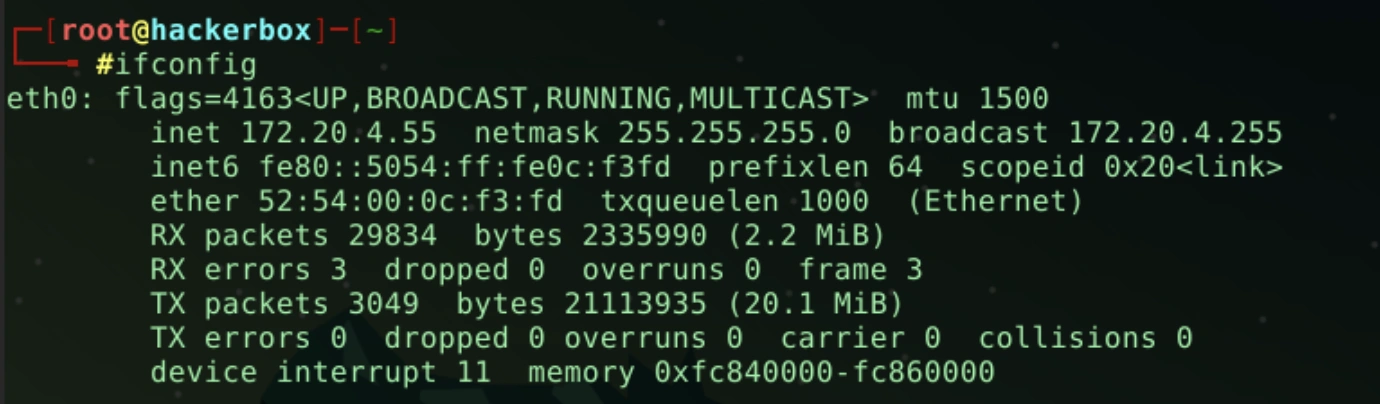
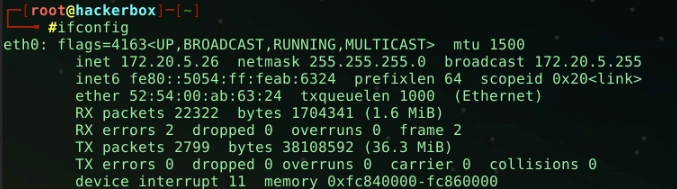
In Windows, the
ipconfig
command, and in Linux-based systems, the
ifconfig
command can display the IP address, subnet mask, and default gateway assigned to your computer.
IPv4 Address Classes
IP addresses are categorized into classes based on network size and address range.
| Class | Network Bits | Host Bits | Address Range |
|---|---|---|---|
| A | 8 | 24 | 1.0.0.0 - 126.255.255.255 |
| B | 16 | 16 | 128.0.0.0 - 191.255.255.255 |
| C | 24 | 8 | 192.0.0.0 - 223.255.255.255 |
- Network bits identify the network, while host bits identify devices within that network.
Subnets
Subnets are a network design concept used to divide a large network into smaller and more manageable parts. By logically grouping the devices in the main network, they allow for better management of network traffic and increased network security.
Subnets are typically used to reduce the number of devices on the network, keep network traffic local, and simplify network management. Additionally, subnets can enhance network security by creating firewalls between different departments or functions within the network.
Subnets are defined by a value called a subnet mask. A subnet mask is used to distinguish the network part and the device part of an IP address. For instance, the subnet mask 255.255.255.0 indicates that the last 8 bits identify the device, and the preceding 24 bits identify the network.
In this way, subnets provide network administrators the flexibility to better organize and manage their networks, thereby improving performance and security in the network.
CIDR (Classless Inter-Domain Routing) Notation
CIDR notation specifies the subnet mask more concisely.
- 192.168.1.0/24 indicates the IP address is 192.168.1.0 with a subnet mask of 255.255.255.0.
- /24 = 11111111.11111111.11111111.00000000
- /24 = 255.255.255.0
Hosts
To determine the number of hosts in a network, use the formula (2^{\text{number of host bits}} - 2).
For an address of 192.168.1.0/24:
- Network Bits: 11111111.11111111.11111111.00000000 / 24
- Host Bits: 00000000.00000000.00000000.11111111
Calculation: (2^8 - 2 = 254) hosts.
Public and Private IP Addresses
Public IP Addresses
- Public IP addresses are globally unique addresses assigned by Internet Service Providers (ISPs) and used for internet communication.
- Accessible and recognizable by any device on the internet.
- Assigned from a global pool managed by international organizations.
- Public IP addresses are directly accessible on the internet and are used for public servers, websites, email servers, etc.
Private IP Addresses
- Private IP addresses are used within local networks and are not routable on the internet.
- Assigned from ranges defined by RFC 1918.
- Used in LANs or home networks and require Network Address Translation (NAT) to communicate with the internet.
| Type | Start IP Address | End IP Address | Subnet Mask |
|---|---|---|---|
| Public | 0.0.0.0 | 126.255.255.255 | 0.0.0.0/1 |
| 128.0.0.0 | 191.255.255.255 | 128.0.0.0/2 | |
| 192.0.0.0 | 223.255.255.255 | 192.0.0.0/3 | |
| 224.0.0.0 | 239.255.255.255 | 224.0.0.0/4 | |
| 240.0.0.0 | 255.255.255.254 | 240.0.0.0/4 | |
| Private | 10.0.0.0 | 10.255.255.255 | 10.0.0.0/8 |
| 172.16.0.0 | 172.31.255.255 | 172.16.0.0/12 | |
| 192.168.0.0 | 192.168.255.255 | 192.168.0.0/16 | |
| 169.254.0.0 | 169.254.255.255 | 169.254.0.0/16 |
The Loopback Address
The loopback address (generally 127.0.0.1), used in computer networks, is a special IP address that routes the data back to the same device. The loopback address is used for a computer to communicate with itself and test network applications.
For example, if a web developer runs a local web server and wants to access it via a browser, they can use http://127.0.0.1 or http://localhost. This allows the developer to test the web application on their local machine.