Network Interface Card (NIC)
A Network Interface Card (NIC) is a physical hardware component that allows a computer to connect to networks. It is used to connect computers to local area networks (LAN) or wide area networks (WAN). The NIC makes network connectivity possible by handling the data exchange between the computer and the network. Therefore, it plays a critical role in network communication.
Each NIC has a MAC (Media Access Control) address, which is assigned by the manufacturer and is unique worldwide. This address allows devices on the network to recognize each other. NICs are available in two different types, both wired and wireless.
Wired NIC
Wired NICs connect to the network via a physical connection such as an Ethernet cable. They may use copper cables with RJ-45 connectors or fiber optic cables to provide higher data transfer speeds. Wired connections generally offer more stable and secure data transfer.
Wireless NIC
Wireless NICs provide a wireless connection to the network using Wi-Fi technology. They are commonly used in laptops, smartphones, and tablets.
Hub
A hub is a network device used to connect multiple devices within a network. Its operation is quite simple; it sends incoming data to all connected ports, and the device that owns the data accepts it. This non-selective nature makes the hub susceptible to unnecessary network congestion and security weaknesses, as all devices connected to a hub can see all network traffic. Hubs are generally used in small, simple, and home networks.
Switch
A switch is a network device that manages data transmission between devices within a network. It connects to each device in the network and sends data only to the intended recipient. This optimizes network traffic and prevents data collisions. Switches operate based on MAC addresses, identifying each device’s unique address on the network and directing data accordingly.
- Assigns a MAC address to each port and transmits data based on these addresses.
- Reduces network traffic by sending data only to the necessary ports.
- Modern switches offer various features (VLAN support, QoS settings) that simplify network management.
Types of Switches
Unmanaged Switch: These switches have a simple plug-and-play design and do not offer advanced configuration options. They are suitable for small networks or as an extension to a larger network.
Managed Switch: These switches offer advanced configuration options such as VLANs, QoS, and link aggregation. They are suitable for larger, more complex networks and allow for centralized management.
Smart Switch: Similar to managed switches in that they offer advanced features, but they are generally easier to set up and manage. They are ideal for small to medium-sized networks.
Router
- A router is a network device that connects different networks and directs data packets to their destinations.
- Used in homes and offices, routers allow multiple devices to share an internet connection and manage network traffic.
- Routers provide security by controlling data flow between different networks.
- Routers direct data packets based on IP addresses, ensuring that data reaches its destination on the internet.
- They enable multiple devices to share a single internet connection, allowing all devices in a home or office to connect to the internet.
Modem
- A modem stands for “modulator-demodulator.”
- It converts analog signals from the internet service provider to digital data and vice versa, allowing computers or other network devices to communicate over the internet.
- Modems play a crucial role in internet access, establishing communication with the ISP to provide an internet connection.
- New generation modems often combine the features of switches and routers.
Types of Modems
Dial-Up Modems: Used to connect to the internet over telephone lines with data transfer speeds typically up to 56 kbps.
DSL Modems: Operate over telephone lines but offer much higher data transfer speeds compared to dial-up modems. ADSL (Asymmetric Digital Subscriber Line) and VDSL (Very High Bitrate Digital Subscriber Line) are some types.
Cable Modems: Use the television cable infrastructure to connect to the internet, providing higher data transfer speeds compared to DSL modems.
Fiber Optic Modems: Use fiber optic cables for data transmission, offering very high-speed internet access. They are typically preferred by businesses or applications requiring high speeds.
Wireless Modems: Connect to the internet via mobile network technologies (3G, 4G/LTE, 5G), ideal for portable internet access.
Access Point (AP)
- An Access Point (AP) allows wireless devices to connect to a wired network.
- APs receive Wi-Fi signals and transfer them over Ethernet to a router or switch, enabling wireless devices to access the network.
- Commonly used in offices and public spaces to provide wide-area Wi-Fi access.
Firewall
- A firewall is a network security device that monitors and controls incoming and outgoing traffic based on predetermined security rules.
- It provides protection against unauthorized access and malicious traffic by inspecting and filtering data packets.
- Firewalls monitor all connections entering and leaving the network, detect suspicious activities, and intervene when necessary.
- They regulate user and device access to the network.
Types of Firewalls
Packet Filtering: The simplest type of firewall filters data packets based on information such as IP address, port number, and protocol.
Stateful Inspection: Tracks the state of connections and uses this information to filter data packets, offering more dynamic and reliable protection.
Application Layer (Proxy Firewall): Controls traffic at the application level, inspecting all data flow for deeper protection.
Next-Generation Firewall (NGFW): Combines traditional firewall features with advanced threat prevention, integrated intrusion prevention systems (IPS), and deep packet inspection.
Network Cable Types
- Network cables enable connections and data transmission between computers, servers, and network devices.
- Various standard network cable types are available, designed for specific purposes.
Coaxial Cable
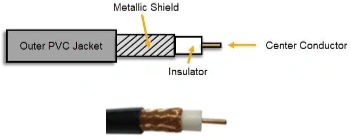
- An older technology, rarely used in network connections except for modem connections.
- Its metallic shield helps protect against electromagnetic interference.
- Categorized by Radio Grade (RG):
- RG-6: Used for modern cable TV and broadband cable modems, offering high-quality signal over long distances.
- RG-8: Used in early 10Base5 “Thicknet” Ethernet, but now replaced by modern technologies.
- RG-58: Used in early 10Base2 “Thinnet” Ethernet and still used in some low-power applications.
- RG-59: Commonly used for closed-circuit TV (CCTV) systems, efficient for short-distance video transmission.
Coaxial Cable Connectors
- BNC Connector
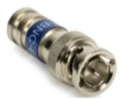
- Often used in security cameras, video equipment, and some network connections.
- F-Connector
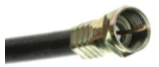
- Preferred for use in cable TV, satellite receivers, and modems.
Twisted Pair Cable
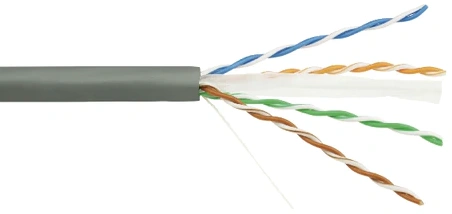
Twisted pair cable consists of pairs of twisted copper wires, commonly used for analog and digital data transmission. It is the go-to choice for setting up local area networks (LANs). The primary purpose of twisted pair cables is to provide reliable data transmission by protecting against electromagnetic interference (EMI) and external noise. The twisted design helps to neutralize the effect of any interference on one wire by its pair, reducing its impact.
Types of Twisted Pair Cables
-
Unshielded Twisted Pair (UTP)
- UTP cables consist of twisted wire pairs surrounded only by an insulation material, without any additional shielding. These cables are commonly used in office buildings and residential setups.
-
Shielded Twisted Pair (STP)
- STP cables include metal shielding around each twisted pair or around all pairs collectively, offering better protection against electromagnetic interference and external noise. STP cables are often used in industrial environments with high noise levels or high-speed data transmission requirements.
Standards for Twisted Pair Cables
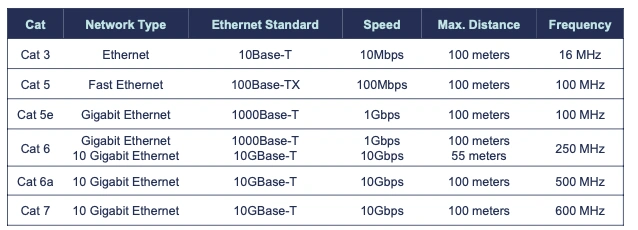
Standards for twisted pair cables describe cable types designed for varying transmission speeds, frequency ranges, and application areas. These standards, known by their category (Cat) labels, form the basis of Ethernet networks and dictate the maximum frequency and transmission speed for each type. Below are the characteristics of these standards.
Twisted Pair Cable Connectors
RJ-11
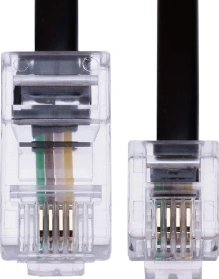
- A 4-pin connector used for telephone connections.
RJ-45
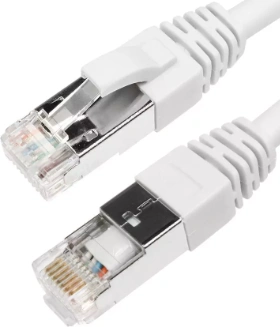
- An 8-pin connector used for computer networking and Ethernet connections.
DB-9
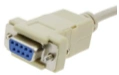
- A 9-pin connector used for serial connections in network devices.
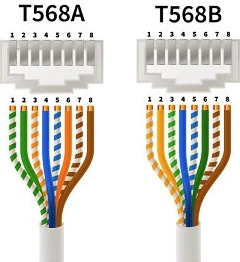
TIA/EIA 568A & 568B Wiring Standards
These are industry standards defining pin configurations for RJ-45 connectors.
- Two Standards:
- 568A & 568B
- 568B is the newer and recommended standard.
- Both are usable.
- Designed to ensure compatibility with other computers and devices.
- Wires within the cable are pinned according to their color sequences.
Straight and Crossover Cabling
Straight-Through Cabling
-
Straight-through cable has the same configuration on both ends. Each pin on one end of the cable connects to the same pin on the other. This type of cable is typically used to connect different types of network devices.
- Connecting a computer to a switch/router
- Connecting a router to a switch
- Connecting a hub to a switch
Crossover Cabling
-
Crossover cable has different configurations on each end. It is typically used to connect similar network devices directly to one another.
- Directly connecting two computers
- Connecting two switches or hubs
- Router peer-to-peer connections
Today, many modern network devices automatically detect and adjust for straight-through and crossover cables using the “Auto-MDIX” feature, allowing users to connect devices without worrying about cable type. This feature has diminished the importance of crossover cables.
Fiber Optic Cabling
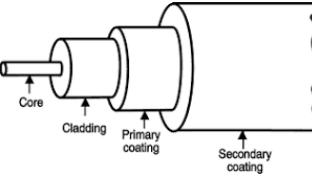
Fiber optic cable is a communication medium that transmits data at high speeds using light signals. These cables consist of a core that guides the light, cladding around the core, and typically an outer protective sheath. Fiber optic cabling ensures high-speed data transmission with low signal loss across long distances, and it is immune to electromagnetic interference. There are two main types of fiber optic cables:
- Multimode Fiber (MMF)
- Suitable for shorter distances (LAN / building to building)
- Up to 2 kilometers
- Singlemode Fiber (SMF)
- More expensive than multimode fiber
- Suitable for longer distances (WAN / city-wide)
- Up to 200 kilometers Note: A 9-micron Singlemode Fiber can travel 75 miles at 400 Gbps.
Fiber Optic Cable Connectors
Lucent Connector (LC)
-

-
Commonly used in MMF & SMF gigabit and 10-gigabit Ethernet networks.
Subscriber Connector (SC)
-

-
Commonly used in MMF and SMF gigabit Ethernet networks.
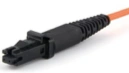
Mechanical Transfer-Registered Jack (MTRJ)
-
-
Houses two fiber optic cables.
-
Designed for MMF networks.