Protocols
- Computers communicate with each other using network protocols.
- Protocols are sets of rules that define how data is exchanged between machines and ensure effective communication.
- In an operating system (OS), a protocol can run as a process or service.
Port
- Ports are logical constructs that associate a unique port number with a protocol process or service.
- Computers need ports due to multi-tasking by network applications.
- Since a computer may have only one IP address, ports differentiate the network protocols and services running on it.
- TCP/IP has 65,536 ports.
- Port numbers from 0 to 1023 are known as well-known ports. These ports are managed and assigned by the IANA (Internet Assigned Numbers Authority). Some important reserved ports are:
| Service, Protocol, or Application | Port Number | TCP/UDP |
|---|---|---|
| FTP (File Transfer Protocol) | 20, 21 | TCP |
| Secure FTP (SFTP) | 22 | TCP |
| SSH (Secure Shell Protocol) | 22 | TCP |
| Telnet | 23 | TCP |
| SMTP (Simple Mail Transfer Protocol) | 25 | TCP |
| DNS (Domain Name System) | 53 | UDP |
| DHCP (Dynamic Host Configuration Protocol) | 67, 68 | UDP |
| TFTP (Trivial File Transfer Protocol) | 69 | UDP |
| HTTP (Hypertext Transfer Protocol) | 80 | TCP |
| POP3 (Post Office Protocol version 3) | 110 | TCP |
| NTP (Network Time Protocol) | 123 | UDP |
| IMAP4 (Internet Message Access Protocol version 4) | 143 | TCP |
| SNMP (Simple Network Management Protocol) | 161 | UDP |
| LDAP (Lightweight Directory Access Protocol) | 389 | TCP |
| HTTPS (Hypertext Transfer Protocol Secure) | 443 | TCP |
| Server Message Block (SMB) | 445 | TCP |
| LDAPS (Lightweight Directory Access Protocol Secure) | 636 | TCP |
| RDP (Remote Desktop Protocol) | 3389 | TCP |
| ITU Telecommunication Standardization Sector A/V Recommendation (H.323) | 1720 | TCP |
| Session Initiation Protocol (SIP) | 5060, 5061 | TCP |
Domain Name System (DNS)
- DNS is a protocol used to resolve a domain name to its corresponding IP address.
- Example: hackviser.com → 162.0.232.236
- By default, it uses UDP port 53. However, TCP port 53 is used for specific cases such as zone transfers or larger responses.
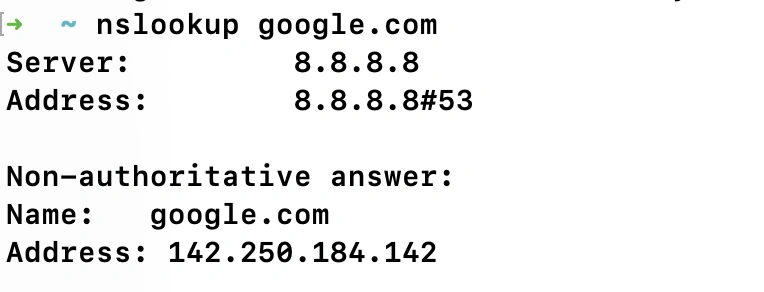
- DNS queries can be performed using the nslookup tool.
-
In the Command Prompt or Terminal, type
nslookup [domain name or IP address]
.
-
Example:
nslookup google.com
-
Simple Network Management Protocol (SNMP)
- SNMP is a protocol used for monitoring and managing network devices.
- It allows administrators to monitor and manage network device status, memory, CPU, and bandwidth usage.
- By default, it uses TCP port 161.
Lightweight Directory Access Protocol (LDAP)
- LDAP is a protocol that provides tools to access and query directory service systems, such as usernames, passwords, and computer accounts.
- Typically operates on Unix/Linux-based or Microsoft Active Directory-based systems.
- By default, it uses TCP port 389.
LDAP Secure (LDAPS)
- LDAPS is the secure version of LDAP that uses SSL to encrypt network traffic.
- By default, it uses TCP port 636.
Server Message Block (SMB)
- SMB is a network file-sharing protocol commonly used in Microsoft environments.
- Allows systems to share files and printers with other systems.
- By default, it uses TCP port 445.
Telnet
- Telnet is an old protocol used for “unsecure” remote connectivity to a host.
- Data is transmitted in plain text, making it insecure.
- Mainly used today for accessing managed network devices like routers via serial connections.
- By default, it uses TCP port 23.
Secure Shell (SSH)
- SSH is a cryptographic protocol used for secure remote connectivity to a host.
- Operates via a terminal console.
- Encrypts data using Public Key Infrastructure (PKI).
- By default, it uses TCP port 22.
Remote Desktop Protocol (RDP)
- RDP is a Microsoft protocol that allows users to connect, view, and control a computer remotely.
- Provides access to the Windows desktop from a remote computer.
- Comes built-in with Microsoft operating systems.
- By default, it uses TCP port 3389.
File Transfer Protocol (FTP)
- FTP is a protocol used to transfer files between computers.
- Can authenticate using usernames and passwords or allow anonymous access.
- Data is transferred in plain text, making it insecure.
- Allows viewing, listing, adding, and deleting files and folders.
- By default, it uses ports 20 (Data Transfer) and 21 (Control).
Secure File Transfer Protocol (SFTP)
- SFTP provides encrypted file transfer over SSH.
- By default, it uses TCP port 22 (the same as SSH).
Simple Mail Transfer Protocol (SMTP)
- SMTP is a protocol used to transmit emails from an email client to the target email server.
- By default, it uses TCP port 25.
Post Office Protocol Version 3 (POP3)
- POP3 is a protocol used to retrieve emails from an email server.
- By default, it uses TCP port 110.
Internet Message Access Protocol (IMAP)
- IMAP is another email protocol that replaces POP3.
- Allows users to access and read email on the server or download it to the client machine.
- By default, it uses TCP port 143.
Hypertext Transfer Protocol (HTTP)
- HTTP is a protocol that provides browsing services for the World Wide Web (WWW).
- Retrieves the content of a web page from a web server.
- Requests are made and returned in hypertext markup language (HTML) format.
- Data is sent in plain text.
- By default, it uses TCP port 80.
Hypertext Transfer Protocol Secure (HTTPS)
- HTTPS is a secure version of HTTP that uses SSL/TLS to encrypt content.
- Uses Public Key Infrastructure (PKI).
- By default, it uses TCP port 443.