TCP/IP Model
-
The TCP/IP model provides a fundamental framework for network communication and forms the basis of the internet.
-
It stands for “Transmission Control Protocol/Internet Protocol” and, like the OSI model, organizes the data transmission process into layers.
-
Developed before the OSI model, it has a simpler structure consisting of four layers: Application, Transport, Internet, and Network Access layers.
-
Each layer handles a different aspect of network communication and provides services to the layer above it.
-
TCP/IP takes its name from its two main protocols: TCP (Transmission Control Protocol) and IP (Internet Protocol), which are the primary protocols of the Transport and Internet layers, respectively.
-
Data flow in the TCP/IP Protocol:
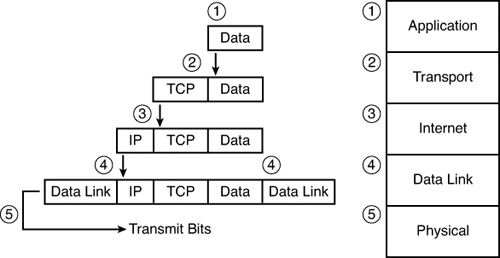
Application Layer
- The Application layer is the topmost layer in the TCP/IP model.
- It provides the interfaces and protocols necessary for end-users to interact with network applications. Applications like web browsers, email clients, and online games operate through protocols in the Application Layer.
Protocols Used in the Application Layer:
- HTTP/HTTPS: Hypertext Transfer Protocol (HTTP) and Secure Hypertext Transfer Protocol (HTTPS) form the foundation of the internet. They manage communication between web browsers and servers. HTTPS combines HTTP with encryption protocols like SSL (Secure Socket Layer) to ensure secure communication during login and authentication processes.
- SNMP: Simple Network Management Protocol uses the TCP/IP protocol suite to manage network devices like routers and switches.
- SMTP: Simple Mail Transfer Protocol is a communication protocol used to send and receive email messages.
- DNS: The Domain Name System (DNS) translates domain names into IP addresses, enabling access to internet resources.
- TELNET: Telecommunication Network allows establishing terminal connections between a local and a remote computer.
- SSH: Secure Shell provides secure access to network devices and servers by encrypting traffic in both directions, unlike TELNET.
- FTP: File Transfer Protocol is used to transfer files from one computer to another.
Transport Layer
- Responsible for end-to-end communication. It controls the data flow and ensures that data packets are transmitted in order.
- The two main protocols used are:
Transmission Control Protocol (TCP)
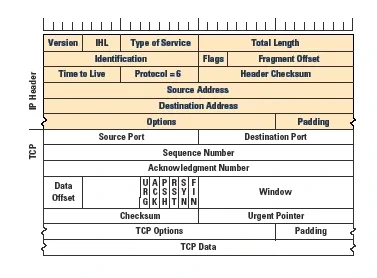
A TCP packet consists of two main parts: the header and the data.
TCP Segment Format: 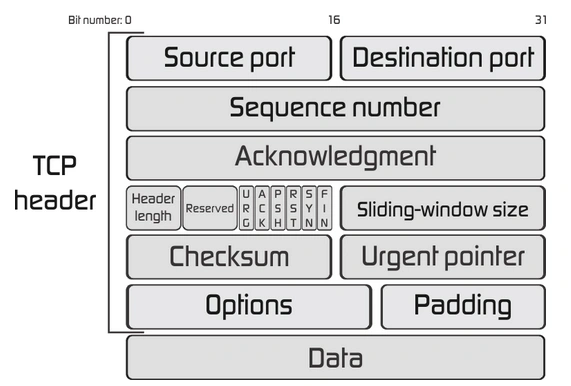
Header: Located at the beginning of the TCP packet, the header is at least 20 bytes long and contains control information necessary for managing and controlling data transmission.
- Source Port: Port number used by the client to initiate communication.
- Destination Port: Port number used by the target computer.
- Sequence Number: Ensures data is reassembled in the correct order.
- Acknowledgment Number: Confirms the receipt of data.
- Header Length: Indicates the length of the header.
- Flags: Contains control signals for managing and terminating connections (e.g., SYN, ACK, FIN).
- Window Size: Indicates the amount of data that can be received without acknowledgment.
- Checksum: Ensures data integrity.
- Urgent Pointer: Indicates the presence of urgent data.
Data: The section following the header, containing the actual data from the application layer.
TCP establishes a reliable connection between two devices on a network, ensuring accurate and reliable data transmission. It detects and retransmits lost or corrupted data packets.
TCP Three-Way Handshake
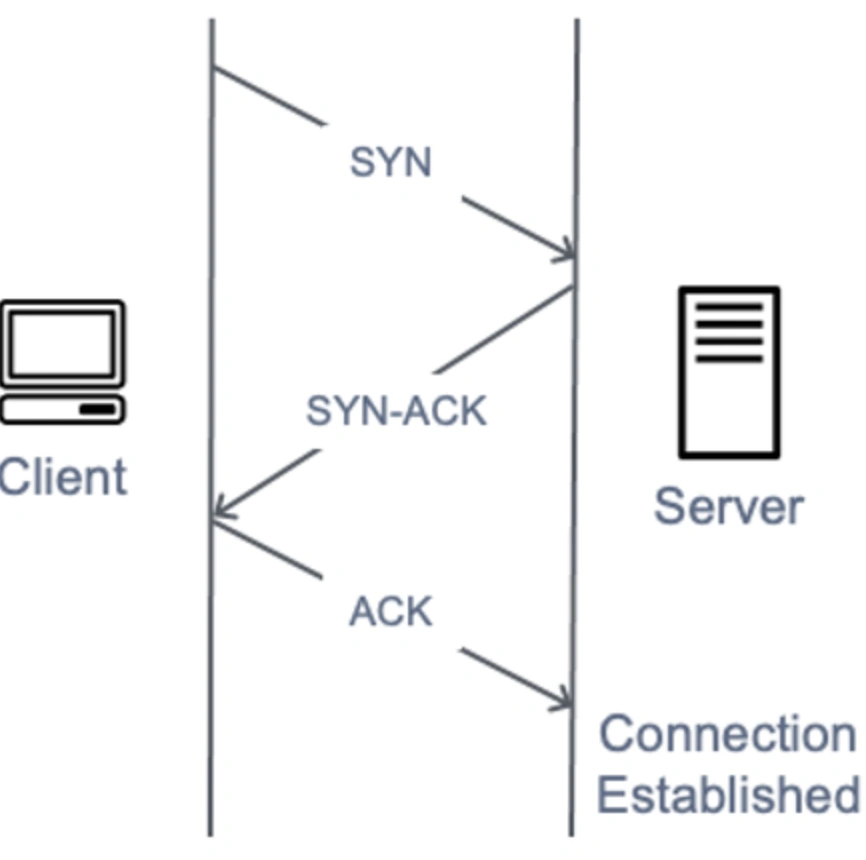
The Three-Way Handshake establishes a reliable connection between two devices over a network using the TCP/IP protocol.
-
1st Step: SYN (Synchronize Sequence Numbers)
- The client sends an SYN packet to the server, indicating the client’s initial sequence number.
-
2nd Step: SYN-ACK (Synchronize-Acknowledgment)
- The server responds with an SYN-ACK packet, containing the server’s initial sequence number and an acknowledgment of the client’s sequence number.
-
3rd Step: ACK (Acknowledgment)
- The client responds with an ACK packet, acknowledging the server’s sequence number.
User Datagram Protocol (UDP)
- One of the protocols used for data transfer by applications.
- Unlike TCP, UDP does not establish a connection before sending data.
- It does not guarantee the delivery of data.
- Lacks flow control and retransmission of lost data.
- Commonly used for audio and video transmission.
UDP Segment Format: 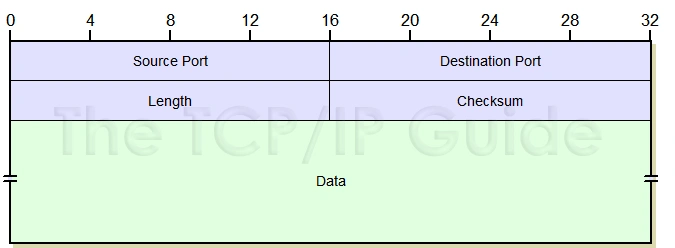
| Header | Description |
|---|---|
| Source Port | Port number used by the client to initiate communication. |
| Destination Port | Port number used by the target computer. |
| Length | Defines the total number of bytes in the header and data. |
| Checksum | Provides optional error-checking. |
Internet Layer
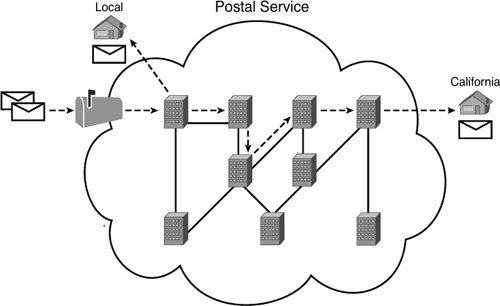
- Forms the backbone of the internet and facilitates global data transfer.
- Ensures the delivery of segments from the transport layer to their destination.
- The most critical protocol in this layer is the Internet Protocol (IP), which gives the layer its name.
Internet Protocol (IP):
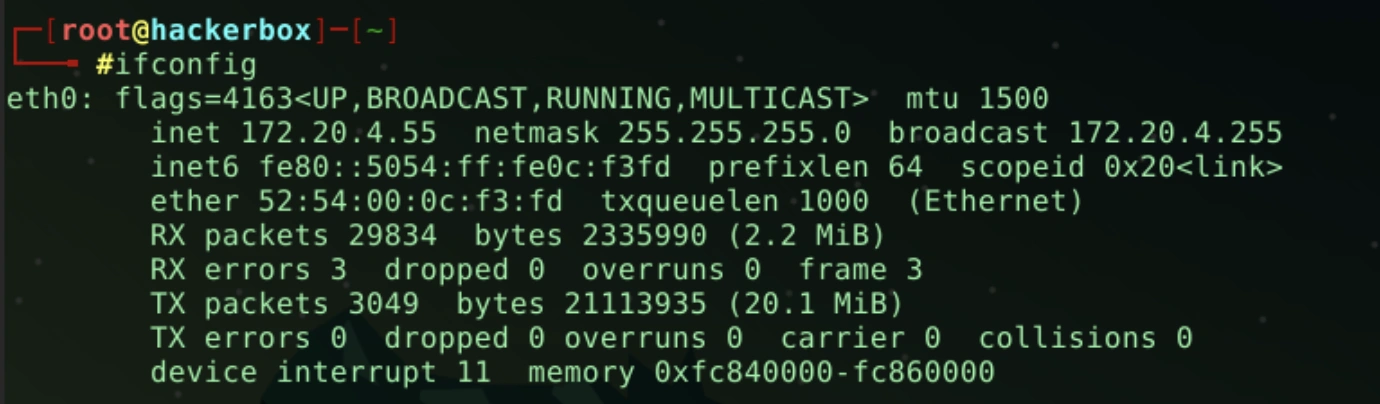
- Identifies each device on the network by a unique IP address.
- The “ifconfig” command in a Linux system displays the assigned IP addresses.
-
Routes data packets using source and destination IP addresses across the network. This process is managed using routing protocols like RIP, OSPF, and BGP.
-
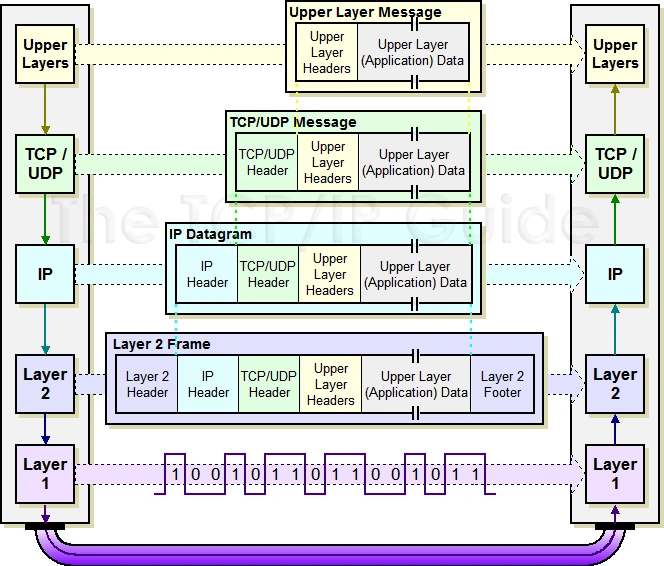
Encapsulates segments from the transport layer with an IP header for addressing.
-
Logical addressing: Defines unique addresses (IP addresses) for devices on the network.
-
Host-to-host communication: Determines the path for data delivery.
-
Data encapsulation: Encapsulates transport layer data into IP datagrams.
-
Fragmentation and reassembly: Divides large datagrams into smaller fragments for transmission, reassembling them at the destination.
-
Routing: Routes IP datagrams across multiple networks to reach their destination.
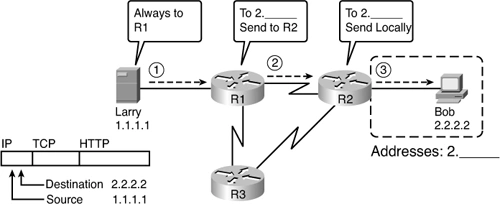
- The image shows IP address packet routing through routers to reach the destination.
- The image illustrates adding an IP header to a TCP segment from the transport layer.
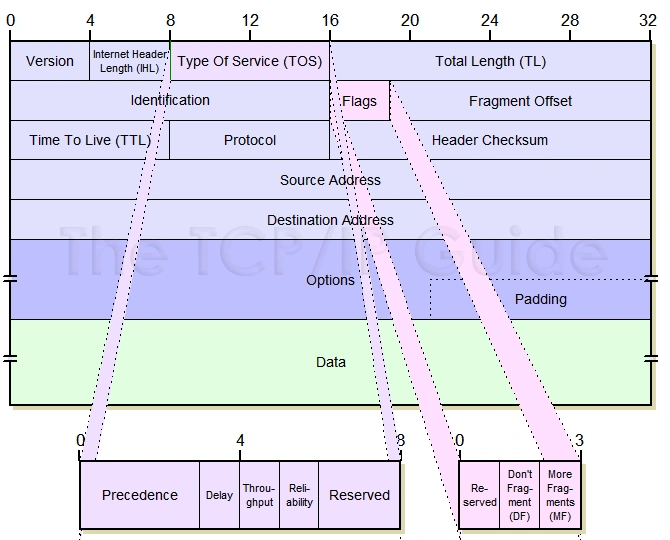
IP Datagram Format:
| Field | Description |
|---|---|
| Version | Defines the IP version. IPv4, IPv6, etc. |
| Internet Header Length (IHL) | Indicates the actual length of the datagram header. |
| Type Of Service (TOS) | Specifies how packets are prioritized and processed on the network. It includes options such as low latency, high bandwidth, high reliability, or low cost. It is currently used for DSCP and ECN fields. |
| Total Length (TL) | Specifies the total length of the datagram in bytes. |
| Identification | Contains a 16-bit value for each fragment of the data. Used by the receiver to reassemble the data. |
| Flags | Indicates the position of fragments in 8-byte units within the datagram. DF (Don’t Fragment) is a 1-bit field instructing routers not to fragment the datagram. Necessary when the recipient cannot reassemble fragments. MF (More Fragments): All but the last fragment of a datagram have MF set to 1. |
| Fragment Offset | If fragmentation occurs, this field indicates the fragment’s position within the overall message. |
| Time To Live (TTL) | Indicates how long a datagram is allowed to exist in the network. Each router decrement this field by one before forwarding. If TTL reaches zero, the datagram is discarded. |
| Protocol | Indicates the higher-layer protocol to which the data belongs (TCP, UDP, ICMP). The receiver’s IP layer uses this field to determine to which protocol the packet should be delivered. |
| Header Checksum | Validation field for the datagram header. Ensures the header’s integrity. |
| Source Address | The IP address of the sending device. |
| Destination Address | The IP address of the receiving device. |
| Options | Optional field used for various purposes, such as security and error reporting. |
| Data | Contains the payload data from the upper layer (Transport layer). |
Internet Control Message Protocol (ICMP) Protocol
- ICMP is a control protocol.
- ICMP messages are sent via the IP protocol.
- If the recipient device is inactive or due to conditions like network congestion, ICMP is used to inform the sender that the data unit cannot be delivered.
- An ICMP protocol primarily uses two terms:
- ICMP Echo Request: Used to check if a target is reachable.
- ICMP Echo Reply: Used to check if the target device responds.
- ICMP’s main responsibility is to report issues, not to correct them. The sender is responsible for managing the issues.
- The ping command is used to test an IP address or domain name.
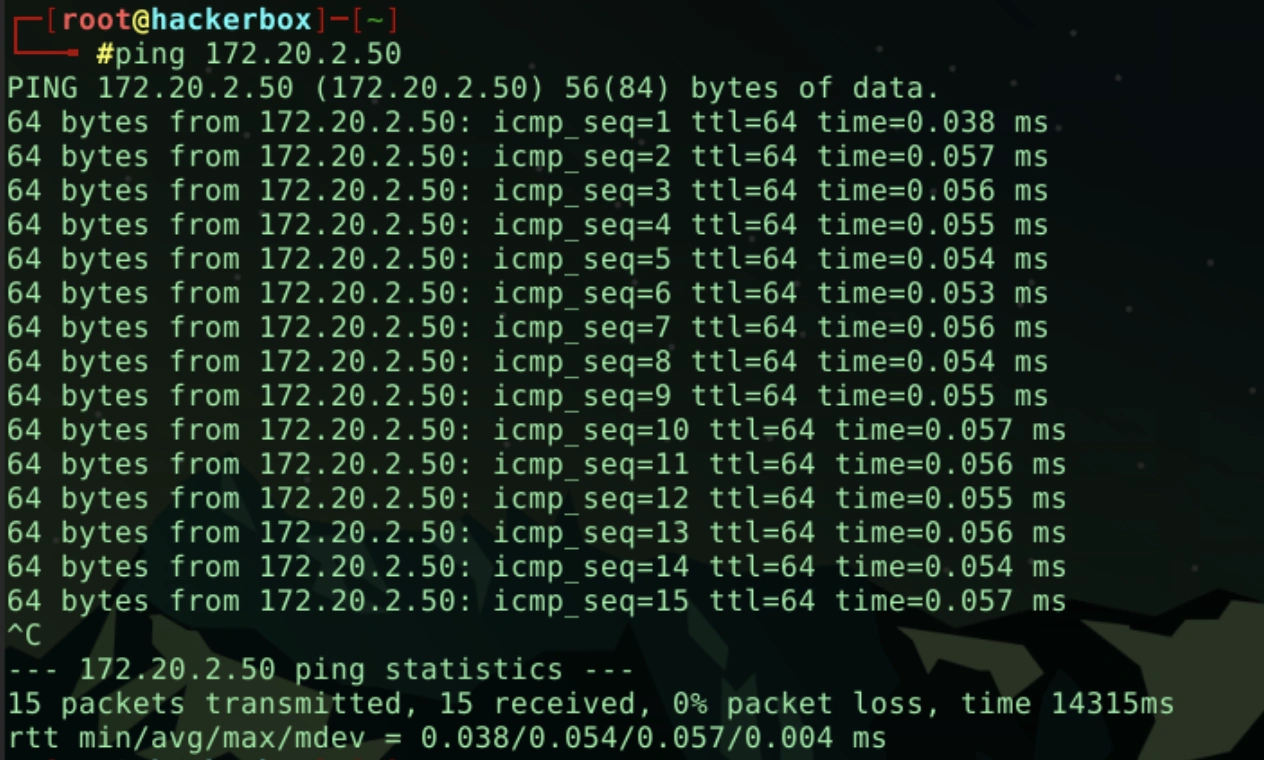
First Line: Shows the target and the size of the data sent by the ping command. Next Lines: Contains information for each Echo Reply: * Bytes: Size of the received response. * ICMP_seq: Sequence number of the packet. * TTL (Time To Live): Maximum time/hops the packet can exist in the network. * Time: Time taken to receive the reply from the target (in milliseconds).
Statistics: * Number of packets sent and received, packet loss percentage, and total duration. * Round Trip Time (RTT): Min, average, max, and standard deviation values, providing network latency information.
Output Significance: * Packet Loss (%): Indicates network reliability. High packet loss might indicate network problems. * Time (ms): Indicates latency or delay. Lower times suggest better network performance. * TTL value: Indicates how long the packet traveled in the network. Lower TTL values might suggest that the packet reached a distant target.
Address Resolution Protocol (ARP)
- ARP stands for Address Resolution Protocol.
- ARP is a network layer protocol used to find the physical address from the IP address.
- Two main terms associated with the ARP Protocol:
- ARP Request: Sent by the sender when it needs to know the physical address associated with an IP address.
- ARP Reply: All devices in the network process the ARP request, but only the device with the matching IP address sends back an ARP reply with its physical address. The sender then caches this physical address and includes it in the data packet’s header.
Address Resolution Protocol (ARP):
- Resolves the IP address to a MAC Address.
- Finds the hardware address of a host for an IP address (and vice versa for RARP).
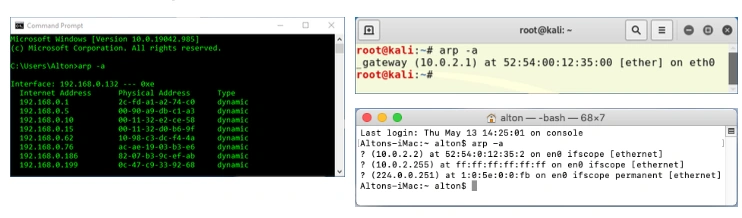
ARP Command:
arp -a
Network Access Layer
- Encompasses the Physical and Data Link layers defined in the OSI model.
- Defines how data is physically transmitted over the network.
- Responsible for data transfer within the same network.
- Functions performed by this layer include encapsulating IP datagrams into frames and mapping IP addresses to physical addresses.
- Protocols used in this layer include Ethernet, Token Ring, FDDI, X.25, and Frame Relay.
Hardware Addressing: Each network device is typically identified by a MAC address. This addressing ensures that devices can recognize each other on the network and provides the necessary physical addresses for data transmission.
Data Framing: The Network Access Layer receives packets (IP Datagrams) from the Internet layer as a whole and performs the framing process by adding physical transmission information to their header and trailer. This process ensures that the receiver can identify where the data begins and ends (start/stop sequences) as it flows over the physical medium, while guaranteeing delivery to the correct destination via MAC addressing.